CLONES & DOMAINS
Clone websites can share a root, web.config, .NET files, and a landing page. The shared landing page does two things:
- Checks the URL for a specific site (domain)
- Redirects the user to the site's home page
For cloned sites, the default landing page redirects users to a site's home page.
As shown below, the URL (HTTP_HOST) is checked for a matching site:
public partial class _Default : System.Web.UI.Page
{
protected void Page_Load()
{
string pDomain = Request.ServerVariables["HTTP_HOST"];
if (pDomain.IndexOf("aaworcester") > -1) { Response.Redirect(
"https://aaworcester.org/Homepage.aspx?GRP=WAI"); }
elseif (pDomain.IndexOf("district23aa") > -1) { Response.Redirect(
"https://district23aa.org/Homepage.aspx?GRP=District23"); }
elseif (pDomain.IndexOf("aaemassd24") > -1) { Response.Redirect(
"https://aaemassd24.org/Homepage.aspx?GRP=District24"); }
elseif (pDomain.IndexOf("aadistrict26") > -1) { Response.Redirect(
"https://aaDistrict26.org/Homepage.aspx?GRP=District26"); }
elseif (pDomain.IndexOf("area30treatment") > -1) { Response.Redirect(
"https://Area30Treatment.org/Homepage.aspx?GRP=A30TC"); }
elseif (pDomain.IndexOf"aaGroup") > -1) { Response.Redirect(
"https://aaGroup.site/aagroup/default.aspx"); }
// uncomment/edit this to enable Mass. State Convention website
// elseif (pDomain.IndexOf"aaMAState") > -1) { Response.Redirect(
// "https://aaWorcester.org/MSC/default.html"); }
}
}
When called, Homepage.aspx configures itself for a specific group. WAI's landing page checks for these co-hosted clones:
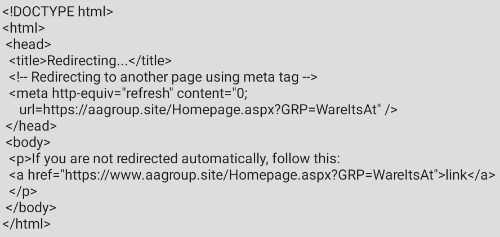
For aaGroup sites, a page like that shown above redirects to a group site, e.g.:
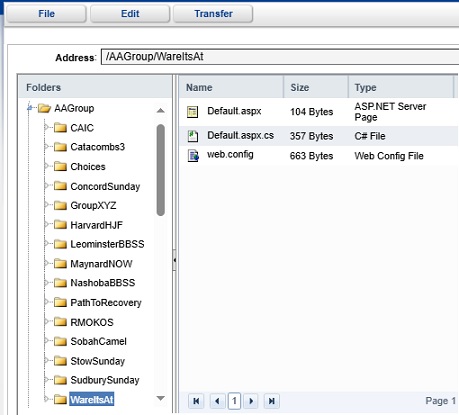
Note: each aaGroup subdomain (clone site) can have its own landing page and web.config file, as shown below.
Cloning a Site
To clone a site, you can copy an existing site or create a clone from a "generic" site.
Only an admin user can clone a site. Cloning documentation is in a separate (confidential) document.
NOTE 1: Sendmail() needs SMTP credentials per site (or a default is used).
NOTE 2: TreatmentCalendar.aspx.cs, if used, must be updated per clone.
NOTE 3: web.config can define a common landing page for co-hosted sites, and each site can have a local web.config.